 Music Folder
- Music Folder
- Worship teams
The sheet music app for worship teams.
Sunday's plan from Planning Center, ready to play. Your team's charts, your own library and a metronome, together on iPhone and iPad.
Planning Center is part of Premium. Try it free for 7 days.
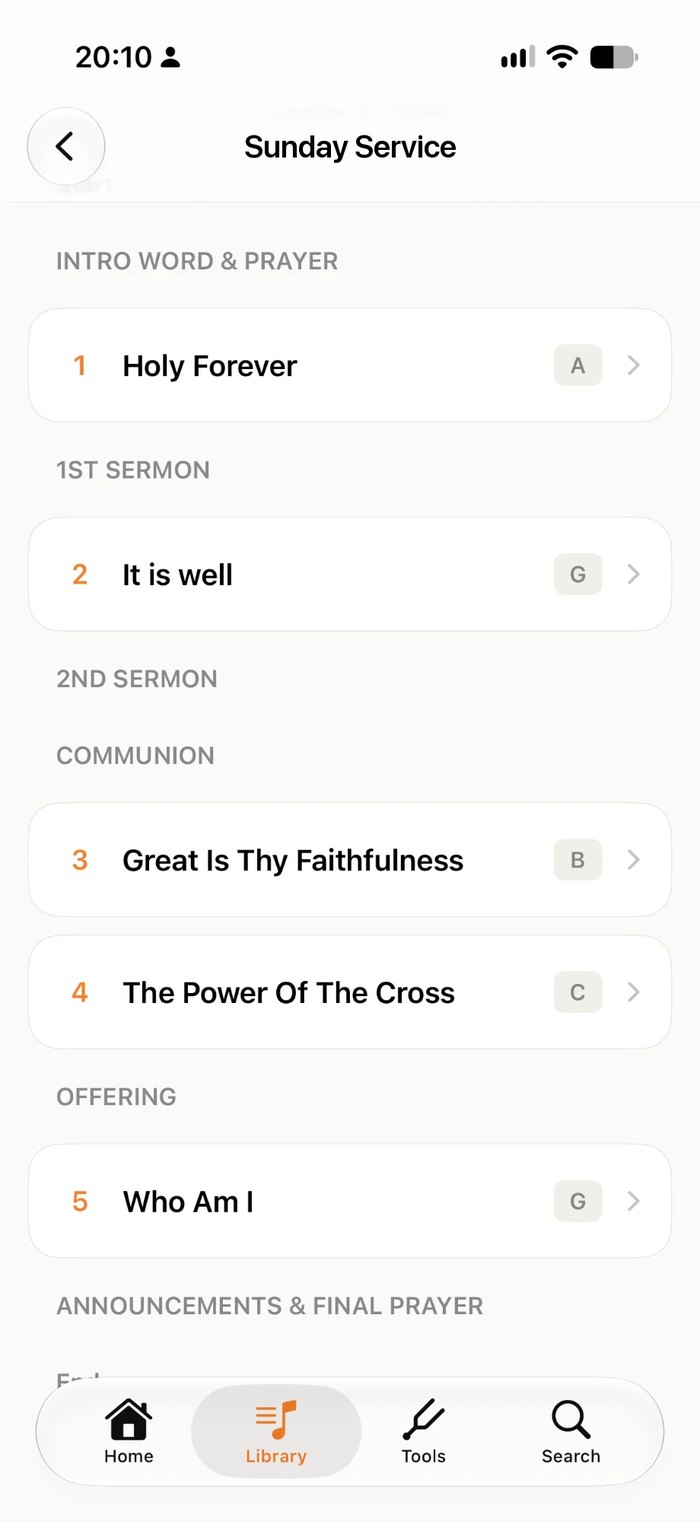
From the plan to the platform.
Connect Planning Center
Sign in with your Planning Center account. Music Folder never sees your password.
Open Sunday's service
Upcoming services appear next to your set lists, in order, with each song's key.
Play it through
Page through the whole service, song by song, with a swipe or a Bluetooth pedal.
Your team's songs and your own.
Build a set from your church's Planning Center library and your own charts side by side. A green dot marks the songs that come from Planning Center.
- Your team's song library as a folder
- Upcoming services next to your set lists
- Read-only: plans stay in Planning Center
- 1Come Thou Fount♩=76
- 2Be Thou My Vision♩=88
- 3Amazing Grace♩=72
- 4It Is Well♩=64
- 5Holy, Holy, Holy♩=84
Rehearsal to Sunday, in step.
Share a set list or a folder of your own charts with the team. Change the order on Thursday and everyone has it by Sunday.
- Live sharing with everyone who uses Music Folder
- Choose who can edit and who can only view
- Mark up your own copy with Apple Pencil
Everything for the service, on one screen.
One tap from the chart.
Metronome
Count the band in at the song's tempo.
Chromatic tuner
Plus alternate guitar tunings.
Tones & drones
Sustained drones for tuning and intonation.
88-key piano
Find a starting note for the singers.
Apple Pencil
Write cues, chords and dynamics on the chart.
Works offline
Your own music needs no signal on the platform.
“Easy to use, clean interface, and has been reliable for me the last 4 years.”
Questions from worship teams
Does Music Folder work with Planning Center?
Yes. Connect your Planning Center Services account and your team's songs appear as a folder, with upcoming services next to your set lists. Access is read-only: plans are still edited in Planning Center.
Do I need Planning Center to use it?
No. Your own library, set lists, markings and tools work on their own. Planning Center is there when your church uses it.
Can the band use it too?
Yes. Each musician connects their own Planning Center account, or you can share a set list or folder of your own music with the team and choose who can edit.
Does it work if the church Wi-Fi drops?
Your own music works completely offline. Planning Center charts you've opened are kept on the device, so open the service once before Sunday.
How much does it cost?
Free for up to 15 songs, 1 book and 1 folder, with iCloud sync. Premium unlocks unlimited music, the complete toolkit and Planning Center: $19.99 a year with a 7-day free trial, $2.99 a month, or $49.99 once for lifetime access. Prices are in US dollars and may vary by region.
Walk on stage ready.
Made by a musician, for musicians.